Tag Archives: Emodest Technology Limited

FonePaw Screen Recorder 7.0.0 Introduces New Features for Enhanced Gameplay Recording and Fluent Streaming

NEW YORK, N.Y. /ScoopCloud/ -- FonePaw Screen Recorder 7.0.0 is ready for better gameplay recording, with enhancements in video sharpness, audio quality, game and microphone volume, and hotkey setting.

Update to FonePaw Screen Recorder 7.0.0

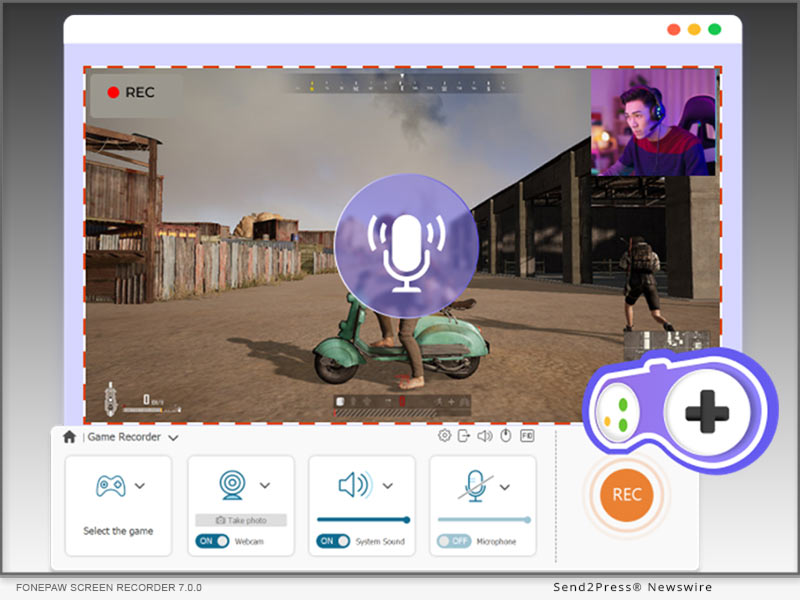
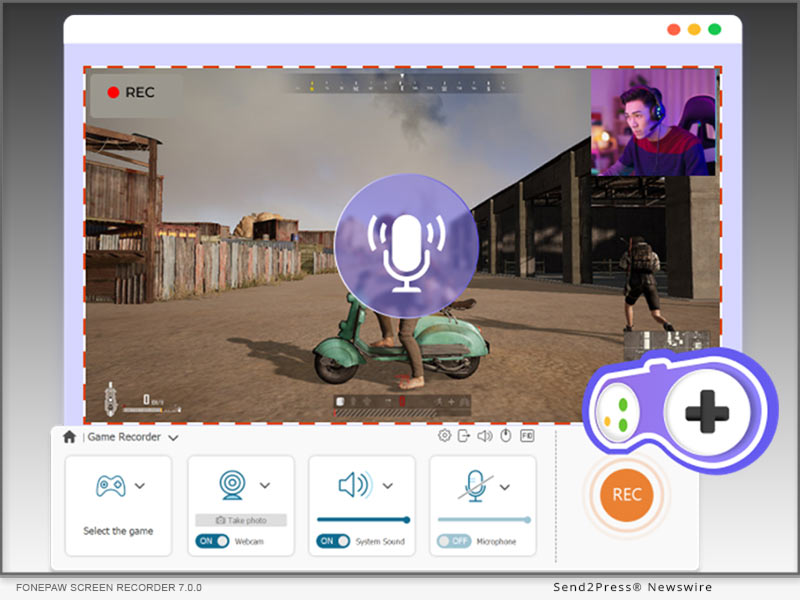
Shout out to FonePaw Screen Recorder users! Based on valuable feedback from users & game players, the updated FonePaw Screen Recorder for game recording has become even more powerful in recording gameplay, enabling users to record 4K 60FPS videos, capture computer screen and webcam simultaneously, adjust microphone volume and game audio settings, and customize hotkeys. As leading software supported by Emodest Technology Limited, FonePaw Screen Recorder never stops improving its functions. New FonePaw Screen Recorder becomes better than ever to Record Games on Steam and other PC gaming platforms. Anticipated by users worldwide, FonePaw Screen Recorder 7.0.0 will debut on June 20, 2023, providing an opportunity to enjoy all the enhancements and features.

Among FonePaw's comprehensive features, the latest update in game recording solidifies its position as the leading recording software. Featuring diverse video and audio settings, high-quality resolution, advanced noise-reduction technology, convenient built-in editing tools, FonePaw Screen Recorder empowers game players to capture and customize their recordings with unparalleled precision and ease. FonePaw undoubtedly ranks top among Best Screen Recorders for Gaming and it is always dedicated to providing the ultimate recording experience that professionals and enthusiasts rely on.

WHAT IS NEW FOR GAME RECORDING?

1 - 4K Video Quality

Users can now delve into the captivating realm of gaming with FonePaw Screen Recorder's support for stunning 4K resolution at 60 frames per second. Leveraging advanced hardware acceleration techniques, this software ensures smooth recordings, devoid of any lag or visual artifacts. Every aspect of gameplay, from the minutest detail to adrenaline-fueled action sequences, is flawlessly captured. With impeccable precision, game players can capture every highlight, showcasing their skills and accomplishments in remarkable visual fidelity. The software's long-term recording capabilities guarantee uninterrupted gameplay sessions, preserving every pivotal moment with marvelous image quality. Besides, as the best screen recorder with no watermark, FonePaw will give you excellent viewing experience with the original scene.

2 - Simultaneous Game and Webcam Capture

FonePaw Screen Recorder 7.0.0 incorporates a webcam overlay. This feature allows users to connect with their audience on a deeper level, providing real-time reactions that enhance the overall viewing experience. With the webcam overlay, viewers can witness every smile, every intense expression, and every celebratory moment as it unfolds during gameplay. To ensure uninterrupted experience, FonePaw Screen Recorder updates with its built-in camera noise reduction feature. Live-streamers can expect their face and voice to be captured with exceptional clarity, ensuring that every nuance and detail is preserved. It is absolutely one of the best tries to align with today's live-streaming trend.

3 - Crystal Clear Audio Adjustment

Hundreds of thousands of posts asked how to adjust game volume and microphone volume during recording, with some even complaining about their recording software failing to make a balance between game volume and microphone volume. FonePaw Screen Recorder 7.0.0 gives its solution-allowing users to capture and adjust gameplay audio, background music, and microphone simultaneously. With advanced noise reduction and microphone enhancement features, microphone voice will be captured with remarkable clarity, ensuring that all the commentary and reactions can be heard loud and clear.

4 - Customizable Hotkeys

Convenient and speedy response means everything in game recording. The new FonePaw Screen Recorder empowers users with the convenience of customizable hotkeys, offering effortless control at their fingertips. Recording functions such as starting or stopping recordings, pausing or resuming, and capturing screenshots are just a keystroke away. The software adapts to individual preferences, providing a user-centric approach that allows gamers and content creators to focus on their craft. Whether it's an epic triumph, awe-inspiring scenery, or a hilarious glitch, users can effortlessly preserve their standout moments with a simple key press.

5 - Distraction-Free Gameplay Capture

FonePaw Screen Recorder introduces Lock-Window Recording, a useful feature that allows users to select and lock the gameplay window during recordings. Users definitely know what a bummer it is when some notification or an unexpected window pops out in the middle of a heated battle. By excluding other windows and stopping on-screen notifications, FonePaw Screen Recorder Lock-Windows mode empowers users to focus solely on their gameplay, capturing every moment with clarity and precision. This feature enhances the quality of gameplay recordings, ensuring an uninterrupted recording environment.

SPECIFICATIONS

Minimum System Requirements

* Windows Operating System: Windows 11, Windows 10, Windows 8.1, Windows 8, Windows 7, Windows Vista, or Windows XP (32-bit or 64-bit)

* Mac Operating System: Mac OS X 10.12 or above

Supported Output Format Specifications

For Windows:

* Video: WMV, MP4, MOV, F4V, AVI, TS

* Audio: MP3, WMA, AAC, M4A

* Screenshot: PNG, JPEG/JPG, GIF, TIFF, BMP

For Mac:

* Video: MP4

* Audio: M4A

* Screenshot: PNG

Pricing:

FonePaw Screen Recorder now offers a 30% discount for all the 3 plans.

Unleash the full potential of your gaming recordings with FonePaw's exclusive discount. Download the free version now or seize the chance to elevate your gaming experiences and subscribe FonePaw Screen Recorder to capture your best gaming moments.

Price after discount

* 1-Month Plan: US$19.56 for 1 PC

* 1-Year Plan: US$38.46 for 1 PC

* Lifetime Plan: US$79.77 for 2 PCs

NOTE All features are fully supported across all subscription plans. Additionally, subscribers to the Lifetime Plan will enjoy the benefit of accessing the software on up to two PCs, along with lifetime free updates.

LEARN MORE:

https://www.fonepaw.com/game-recorder/

https://www.fonepaw.com/recorder/record-gameplay-on-steam.html

https://www.fonepaw.com/recorder/top-game-recorders.html

https://www.fonepaw.com/recorder/free-screen-recorder-no-watermark.html

About FonePaw:

Born in Emodest Technology Limited, FonePaw is a leading software developer committed to providing innovative tech solutions, with FonePaw Screen Recorder being one of its flagship products. With a focus on excellence and user satisfaction, FonePaw continues to push boundaries in software development, delivering reliable and problem-solving solutions for users worldwide.

Official Website: https://www.fonepaw.com/

Contact E-mail: support@fonepaw.com

Youtube page: https://www.youtube.com/@Fonepaw
News from FonePaw

FonePaw Screen Recorder 7.0.0 is ready for better gameplay recording, with enhancements in video sharpness, audio quality, game and microphone volume, and hotkey setting. Among FonePaw's comprehensive features, the latest update in game recording solidifies its position as the leading recording software.

Related link: https://www.fonepaw.com/

This version of news story was published on ScoopCloud™ (ScoopCloud.com) - part of and © the Neotrope® News Network - all rights reserved.
VideoSolo Screen Recorder – The Ultimate Solution for Capturing and Recording Videos

NEW YORK, N.Y. /ScoopCloud/ -- In today's digital age, the need for capturing and recording videos has become increasingly important. Whether you're a content creator, educator, gamer, or professional, having a reliable screen recording software is essential. VideoSolo Screen Recorder from Emodest Technology Limited emerges as a powerful tool that provides an exceptional video recording experience with its wide range of features and user-friendly interface.

Overview of VideoSolo Screen Recorder

VideoSolo Screen Recorder is a cutting-edge software designed to record videos from your screen effortlessly. It allows users to capture high-quality videos in various formats and resolutions, making it suitable for diverse needs. With its intuitive interface and customizable settings, VideoSolo Screen Recorder stands out from the competition as an efficient and versatile solution.

BENEFITS OF USING VIDEOSOLO SCREEN RECORDER

High-quality video recording: VideoSolo Screen Recorder offers an array of options to ensure high-quality video captures. It enables users to record videos in different formats, including MP4, AVI, FLV, and more. Additionally, the software allows recording audio from system sound or external sources, providing users with comprehensive audio recording capabilities.

Easy-to-use interface: VideoSolo Screen Recorder boasts a user-friendly interface that simplifies the recording process. Its intuitive controls and settings make it accessible for users of all levels of expertise. Whether you're a beginner or an advanced user, you can easily navigate through the software and start recording without any hassle. The interface is designed to be straightforward and visually appealing, ensuring a seamless recording experience.

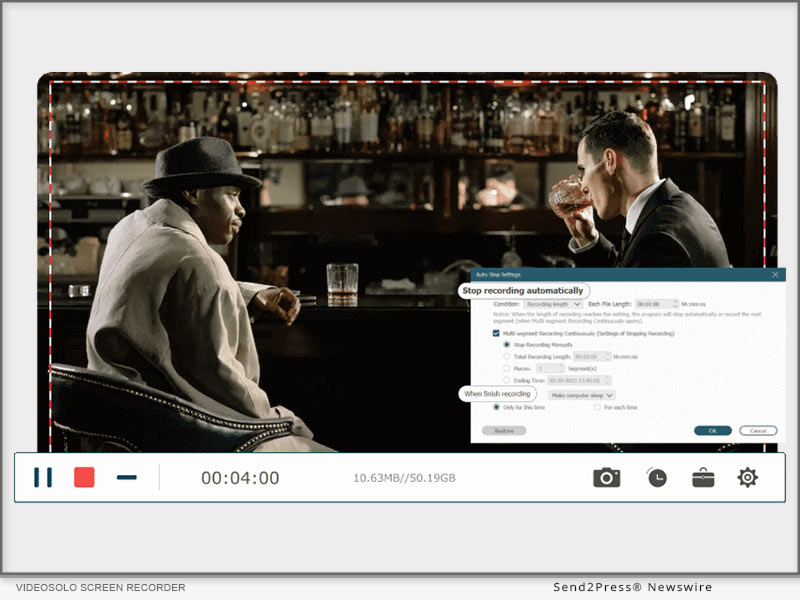
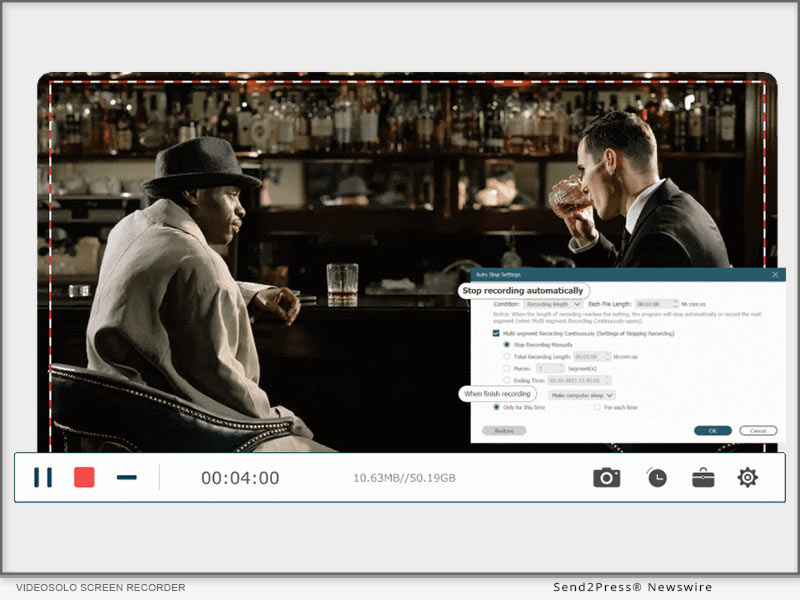
Versatility and flexibility: VideoSolo Screen Recorder offers versatile recording options to suit various needs. Users can choose to record the full screen, specific windows, or selected areas of their screen. This flexibility allows for targeted and precise recordings. Moreover, the software provides the ability to schedule and automate recordings, saving time and effort for users who require regular screen capturing.

Editing and sharing options: VideoSolo Screen Recorder goes beyond just capturing videos; it also provides editing and sharing functionalities. Users can trim, crop, and enhance their recorded videos directly within the software, eliminating the need for third-party editing tools. Furthermore, the software offers seamless integration with popular social media platforms, allowing users to easily share their recordings with a wider audience.

How to Use VideoSolo Screen Recorder

Using VideoSolo Screen Recorder is a breeze, even for those new to screen recording software. Here is a step-by-step guide to get you started:

Installation and setup:

* Visit the official VideoSolo website at https://videosolo.net/screen-recorder/ and download the software.

For Windows: https://videosolo.net/best-screen-recorder-windows-10/

For MAC: https://videosolo.net/best-screen-recording-software-mac/

* Follow the on-screen instructions to install VideoSolo Screen Recorder on your computer.

* Once installed, launch the software and familiarize yourself with the user interface.

Recording options and settings:

* Select the desired recording area by choosing between full screen, specific windows, or custom regions.

* Adjust the audio settings to capture system sound, microphone input, or both.

* Explore the various output formats and resolutions available to suit your needs.

* Customize additional settings such as hotkeys, frame rates, and cursor effects to enhance your recordings.

Start recording:

* Click the "Record" button or use the designated hotkey to begin your recording.

* During the recording, you can pause, resume, or stop the process as needed.

* Take advantage of the editing tools provided by VideoSolo Screen Recorder to enhance your video for Zoom Meeting , Use our guide : https://videosolo.net/record-zoom-meeting/.

Save and share your recordings:

* Once you're satisfied with your recording, save it to your preferred location on your computer.

* If you wish to share the recording, VideoSolo Screen Recorder allows you to directly upload your videos to popular social media platforms like YouTube, Facebook, and Vimeo.

Use Cases and Applications

VideoSolo Screen Recorder caters to a wide range of use cases and applications, including:

Recording online tutorials and educational videos:

Whether you're an online educator or a student, VideoSolo Screen Recorder is an invaluable tool for creating instructional videos, online courses, and tutorials. Capture your screen, demonstrate software or concepts, and deliver engaging educational content.

Creating software demonstrations and walkthroughs:

Developers and software trainers can utilize VideoSolo Screen Recorder to showcase their products and guide users through step-by-step tutorials. Record software demonstrations, highlight key features, and provide comprehensive instructions for your audience.

Capturing gameplay and streaming sessions:

Gamers can leverage the power of VideoSolo Screen Recorder to capture their gameplay, create gaming highlights, and share their gaming experiences with others. Whether you're a professional streamer or an avid gamer, the software ensures smooth and high-quality video recordings.

Recording video conferences and webinars:

VideoSolo Screen Recorder is an excellent companion for professionals participating in video conferences, webinars, or online meetings. Capture important discussions, presentations, or training sessions, and revisit them later for reference or sharing.

Comparison with Other Screen Recording Software

VideoSolo Screen Recorder stands out among its competitors due to its exceptional features and usability. When compared to other screen recording software options, VideoSolo Screen Recorder offers several advantages:

* Superior video quality: VideoSolo Screen Recorder ensures high-quality video captures with various formats and resolutions, providing users with crisp and clear recordings.

* Intuitive interface: The user-friendly interface of VideoSolo Screen Recorder makes it accessible to users of all levels of expertise. Its straightforward controls and settings simplify the recording process.

* Customizable recording options: Users have the flexibility to choose the recording area, whether it's the full screen, specific windows, or custom regions. This level of customization allows for precise and targeted recordings.

* Automation and scheduling: VideoSolo Screen Recorder allows users to schedule and automate recordings, making it convenient for those who require regular screen capturing without manual intervention.

* Integrated editing and sharing features: With built-in editing tools, users can trim, crop, and enhance their recordings within VideoSolo Screen Recorder itself. Additionally, seamless integration with popular social media platforms enables easy sharing of captured videos.

Testimonials and Reviews

Here are a few testimonials from satisfied VideoSolo Screen Recorder users:

* "VideoSolo Screen Recorder has revolutionized my online teaching experience. The ability to capture my screen effortlessly and share educational content with my students has made a significant impact on their learning." - Emily, Online Educator

* "As a software developer, I've tried several screen recording tools, but VideoSolo Screen Recorder surpasses them all. The quality of the recordings is exceptional, and the intuitive interface makes it a pleasure to use." - Mark, Software Developer

* "VideoSolo Screen Recorder is my go-to solution for recording gameplay and streaming sessions. It captures every detail without affecting the performance, allowing me to share my gaming experiences with my audience seamlessly." - Sarah, Gaming Streamer

Pricing and Availability

VideoSolo Screen Recorder is available for both Windows and Mac operating systems. To explore the pricing options and check for any available discounts or offers, visit the official VideoSolo Screen Recorder website at https://videosolo.net/screen-recorder/.

Conclusion

In conclusion, VideoSolo Screen Recorder is a versatile and powerful software that caters to the needs of content creators, educators, gamers, and professionals alike. With its high-quality video recording capabilities, user-friendly interface, and customizable features, it provides an exceptional screen recording experience. Whether you're recording tutorials, software demonstrations, gameplay, or video conferences, VideoSolo Screen Recorder is the ultimate solution for capturing and recording videos with ease.

Learn more: https://videosolo.net/

MULTIMEDIA:

Videos on YouTube: https://www.youtube.com/@videosolo809

News from Emodest Technology Limited

In today's digital age, the need for capturing and recording videos has become increasingly important. Whether you're a content creator, educator, gamer, or professional, having a reliable screen recording software is essential. VideoSolo Screen Recorder from Emodest Technology Limited emerges as a powerful tool that provides an exceptional video recording experience with its wide range of features and user-friendly interface.

Related link: https://videosolo.net/

This version of news story was published on ScoopCloud™ (ScoopCloud.com) - part of and © the Neotrope® News Network - all rights reserved.