Tag Archives: Chengdu

PearlMountain Launches DesignEvo that Enables Everyone to Make Professional Logos for Free

CHENGDU, China /ScoopCloud/ -- PearlMountain is proud to announce the new release of DesignEvo, a free online logo maker that helps users make unique and professional logos.

The logo is the most essential part of making any brand recognizable. Hiring a professional designer to create a custom logo can definitely be expensive, especially for most small business owners and individuals who don't have the budget. Fortunately, the release of DesignEvo allows everyone to create professional logos without using complicated design software or hiring a professional designer.

"We are thrilled to launch DesignEvo. It will help a lot of people create professional-looking logos without spending much and without wasting time. Whether you're a small business owner or a start-up who needs a logo design for branding and marketing needs but don't have a budget, DesignEvo is a great solution for you," says Lin Xiao, the CEO of PearlMountain Limited.

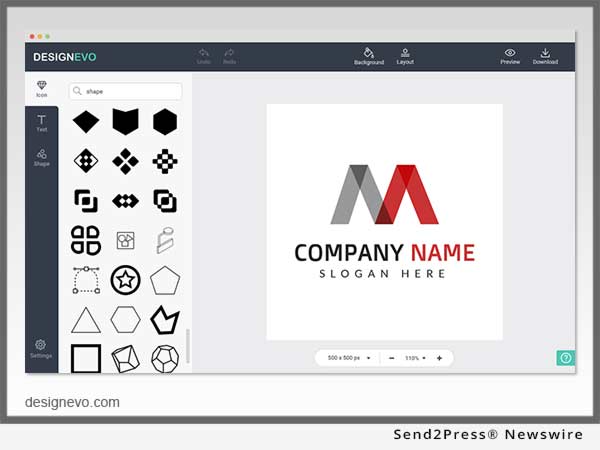
DesignEvo makes it simple and stress-free to turn any brand identity into visual art. By searching through millions of professionally designed icons, adding logo texts and editing with little effort, users have a custom logo ready to download, fast and time-saving. People who don't have the time, experience, or the budget to pay a designer can have DesignEvo as their free logo design expert.

The ease of use, free to access, and user-friendly features set DesignEvo apart from its competitors. Users have complete control over how their logos should look like. They are able to boost their creativity with tons of icons and text fonts to choose from. Anyone, regardless of their design experience, can create unique logos in minutes and use on their websites, shirts, business cards, letterheads, social media, and any other marketing presence.

"We aim to make the logo design process simple, fast, effective, and free. DesignEvo eases the process of logo design, and we hope it helps more people to create compelling logos that can take their business/brand to the next level," says Lin Xiao.

DesignEvo assists everyone in creating professional and attractive logos at absolutely no cost. It works in any browser, with no need to register and download. For more details, please visit https://designevo.com/.

About DesignEvo:
DesignEvo is a free online logo maker developed by PearlMountain Limited. It makes logo design simple and straightforward, and provides users with the most convenient experience.

Facebook: https://www.facebook.com/designevoapp/
Twitter: https://twitter.com/designevoapp

Media Contact:
Lin Xiao, CEO
of PearlMountain Limited
info@designevo.com

*PHOTO for media: Send2Press.com/300dpi/17-0905s2p-designevo-300dpi.jpg

News from PearlMountain Limited

PearlMountain is proud to announce the new release of DesignEvo, a free online logo maker that helps users make unique and professional logos. The logo is the most essential part of making any brand recognizable. Hiring a professional designer to create a custom logo can definitely be expensive, especially for most small business owners and individuals who don't have the budget.

Related link:

This version of news story was published on ScoopCloud™ (ScoopCloud.com) - part of and © the Neotrope® News Network - all rights reserved.

ScoopCloud Newswire

FotoJet Photo Editor is An Extremely Easy Way to Edit Photos

CHENGDU, China /ScoopCloud/ -- FotoJet, developed by PearlMountain Limited, is an excellent photo editor that can help users to get brilliant photos with a straightforward interface and powerful functions. It gives users a lot of room to beautify the photos with numerous editing choices.

With FotoJet, users have the ability to make some basic adjustments such as crop, resize and rotate, as well as advanced features like focus, color splash and dehaze. Additionally, a mass of filters, stylish fonts, clipart images, overlays and frames are provided to give users a satisfying photo editing experience.

Take a look at the basic photo editing options: It is easy to crop photos with FotoJet. Just click the crop button and adjust the crop box to specify the area of the photo users want to keep. What's thoughtful is that there are some preset aspect ratios on the dropdown menu, including Golden Radio, Facebook Cover, iPhone 6 and more, which enables users to customize some social media graphics and wallpapers. Flexibly resize and rotate the photo to arrange it perfectly. Changing a photo's exposure, shadows, saturation and more elements just need a few clicks.

FotoJet's photo editor also has advanced editing features which give more possibilities to the photo. Users can touch up photos by adjusting sharpness, clarity, vignette and noise. Both Focus and Color Splash can help users to highlight a certain part. The former achieves that by making the unimportant part blurred. The latter is to make the target part in colors and leave everything else in gray-scale.

Dozens of beautiful photo effects that cover B&W, Vintage, Lomo and Old Photo win the favor of users. They can preview how their photo will look on each effect in different intensities and decide to apply it or not. Users are capable of editing photos more creatively by adding clipart images, overlays and frames to the photo. It is also allowed to type in some text and adjust its size, color, font and alignment.

When all the adjustments are finished, just click the B/A button to make a contrast with the original image. It will be a great surprise. With numerous easy-to-use editing tools, users are glad to explore more choices for editing photos and get a pro-looking personal photo with FotoJet. Give another brush to the photo at: https://www.fotojet.com/features/photo-editor/.

About FotoJet:
FotoJet is an online photo editing and graphic design tool developed by PearlMountain Limited. FotoJet is dedicated on graphic design and image processing technology, to provide users with the most convenient image editing services. Currently FotoJet already has millions of worldwide users.

Learn more at https://www.fotojet.com/.

FotoJet, developed by PearlMountain Limited, is an excellent photo editor that can help users to get brilliant photos with a straightforward interface and powerful functions. It gives users a lot of room to beautify the photos with numerous editing choices.

This version of news story was published on ScoopCloud™ (ScoopCloud.com) - part of the Neotrope® News Network - all rights reserved.

ScoopCloud Newswire

EaseUS Launches Main Update of Interactive Interface for Data Recovery Wizard 11.0 to Improve Users’ Experience in Recovering Lost Data

CHENGDU, China /ScoopCloud/ -- EaseUS Data Recovery Wizard 11.0 has just been released with brand new interface to simplify whole data recovery process to minimize cost and time. This popular data recovery software restores lost or deleted document, photo, music, video, audio and email from almost catastrophic data loss disasters like hard drive damage, disk or partition formatting, virus attack, system crash, partition loss, RAW partition, operation error, etc.

By EaseUS 11.0 version data recovery wizard, only three easy steps are needed to get everything lost back again. Tuned software interface guides users to locate where data loss occurs precisely, search for lost files at flashing speed and save lost data within just few of clicks.

After launching the data recovery program, quick scan automatically begins to retrieve corrupted files on storage media such as hard drive, SSD, USB, memory card, SD card, CF card, digital camera and music player. As quick scan ends, deep scan is running immediately to search for much more lost, hidden or inaccessible data thoroughly. The search results are displayed respectively and clearly for users to target recoverable files with ease.

There is nothing worse than losing data that matters most and is irreplaceable. Most often the reasons for data loss are accidental. Prompt data rescue takes effects when original data is not overwritten. EaseUS safe data recovery solution allows users to preview all recoverable data before jumping into recovery process.

Meantime, it's convenient to pause or resume scanning in the lost data tracking. When all lost or deleted files are retrieved, data filtering is much necessary to target the right files. On the interface, all found files are listed in order and easy to discriminate by file or file folder's name and the amount of lost files.

EaseUS deleted file recovery software does really help in putting deleted files out of Recycle Bin, recovering everything from formatted hard drive or partition, partition loss or RAW partition. This professional data recovery solution is an easy and effective attempt to save lost data as the user-friendly interface across all storage devices makes every step much clear.

New EaseUS Data Recovery Wizard 11.0 is available now at:
http://www.easeus.com/data-recovery-software/

About EaseUS Software:

EaseUS provides professional IT solutions for home, education and SMB users, service providers in data recovery, backup, system optimization and partition manager on both Windows and Mac platforms. Founded in 2004, EaseUS has established itself as a fast-growing international company with over 100,000,000 wonderful users in the world. For more information, please visit http://www.easeus.com.

"EaseUS" is registered trademark of CHENGDU Yiwo Tech Development Co., Ltd."

EaseUS Data Recovery Wizard 11.0 has just been released with brand new interface to simplify whole data recovery process to minimize cost and time. This popular data recovery software restores lost or deleted document, photo, music, video, audio and email from almost catastrophic data loss disasters like hard drive damage, disk or partition formatting, virus attack, system crash, partition loss, RAW partition, operation error, etc.

This version of news story was published on ScoopCloud™ (ScoopCloud.com) - part of the Neotrope® News Network - all rights reserved.