Tag Archives: webcam software

iTop Screen Recorder 3 makes it surprisingly easy to record and create awesome videos

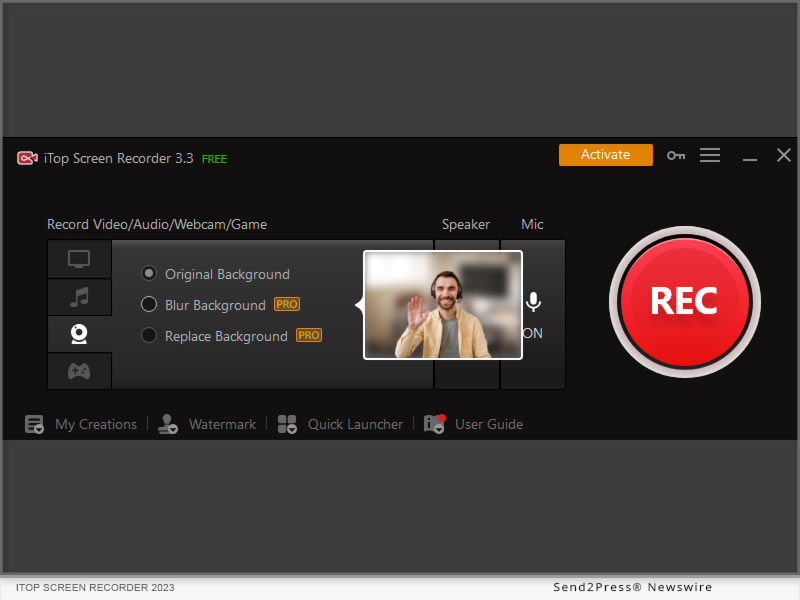
SAN FRANCISCO, Calif. /ScoopCloud/ -- iTop today officially released iTop Screen Recorder 3.3 version, featuring new enhancements in webcam recording, virtual background selection and video size compression. iTop Screen Recorder has been a top-ranking free screen recorder on Windows owing to its solid recording performance, HD video quality and great ease of use. The newly added webcam recording mode offers more privacy as it can change or blur the real-time video background.

Video is the most effective way to connect and share information with friends, colleagues and customers. iTop Screen Recorder let users quickly record PC screens, picture-in-picture webcam videos, or audio in high quality over the past versions. This update added HD full-screen camera recording and virtual backgrounds, offering great experiences for users who want to record themselves from a webcam. Users can easily create professional demons, tutorials and presentation videos in whatever style in an easy, private and stunning way. The highlights of new the version contain the following.

HD Webcam Recording

The webcam recording mode allows users to record from external camera devices such as USB webcams in HD quality. Users can flexibly choose "full screen" or "picture in picture" modes to capture themselves and screen with audio the way they want. The GPU encoding technology adopted by iTop Screen Recorder enables smooth high-performance game recording with a webcam with no frame rate drops.

Virtual Background

Users can blur, remove and change the background in real time when they are recording themselves from the webcam. The blur effect can hide the real background so that the viewer can't see objects behind the speaker. No matter whether it is a messy living room or a noisy public space, the speaker can have their private information hidden. In this way, more freedom, privacy and creativity are granted when creating a video from a webcam.

Video Compression Tool

iTop Screen Recorder newly added a built-in video compression tool. Users can compress any video files within the software to reduce video size without having to compress them separately with a third-party tool. The compression tool helps largely compress the video file size with no quality loss. Moreover, making it faster to share videos through different platforms, especially with those who have size limitations like E-mail.

"We made an effort in this version update to make iTop Screen Recorder a more comprehensive video-creating tool," said Sam, PM of iTop Screen Recorder. "Tutorials, real-time meeting footage, presentations or any training videos can be made quickly with no privacy or quality concern with the 'virtual background' feature. Some bugs in the video editor had also been fixed, therefore users are expected to enjoy a smoother and friendlier recording experience from this version."

The new iTop Screen Recorder is now available for all Windows 11, 10, 8.1, 8, and 7. The 3.3 version update can be downloaded from the Official Website iTop Screen Recorder.

Learn more at: https://recorder.itopvpn.com/

About iTop:

Founded in 2016, iTop has been creating tools and software that run on both desktop PCs and mobile devices. iTop product line includes VPN, screen recorder, data recovery software, password manager and many other utilities. Trusted by more than 20+ million users, iTop's mission is to enable users a secure and more enjoyable digital life. By creating intuitive, smart, stable & secure software products all the while, we managed to keep our pride as a tech-oriented company. Learn more: https://www.itopvpn.com/.
News from ITop

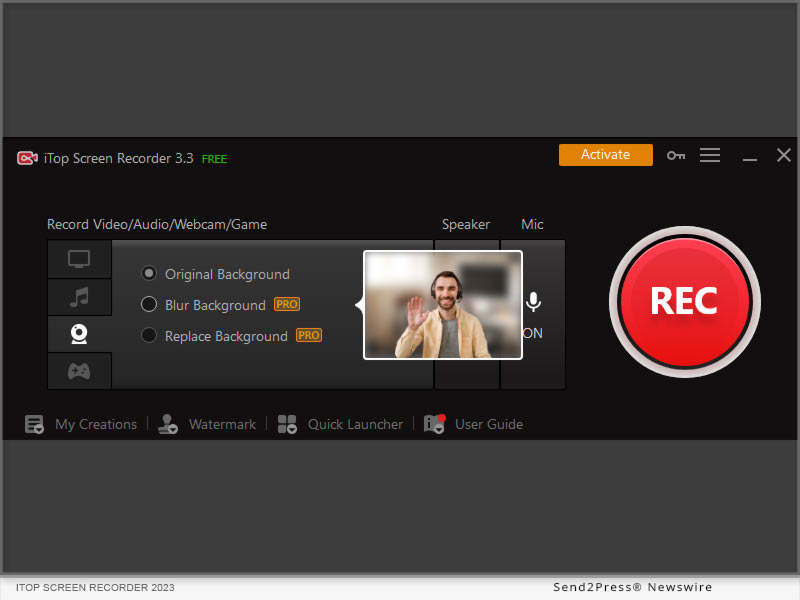
iTop today officially released iTop Screen Recorder 3.3 version, featuring new enhancements in webcam recording, virtual background selection and video size compression. iTop Screen Recorder has been a top-ranking free screen recorder on Windows owing to its solid recording performance, HD video quality and great ease of use.

Related link: https://recorder.itopvpn.com/

This version of news story was published on ScoopCloud™ (ScoopCloud.com) - part of and © the Neotrope® News Network - all rights reserved.
FineCam Debuts for Elevating Video Calling and Streaming Experiences with Advanced Webcam Enhancing Solutions

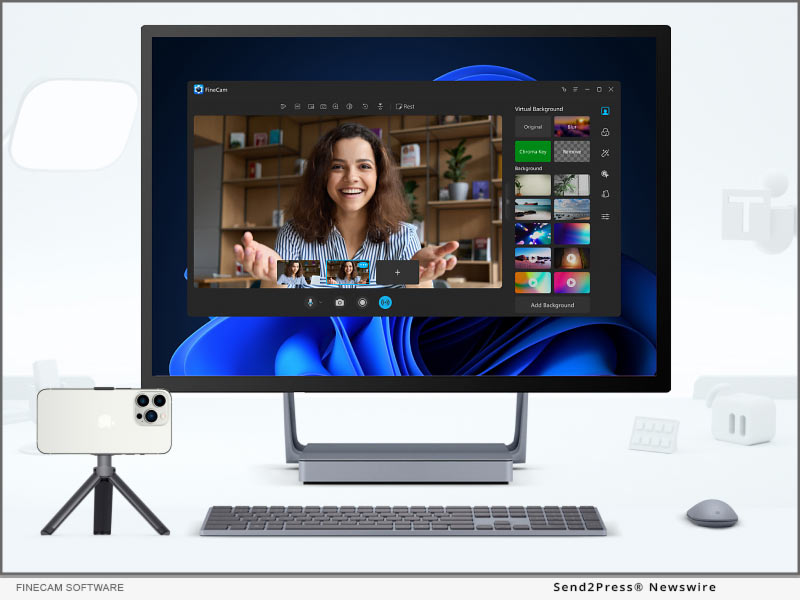
LOS ANGELES, Calif. /ScoopCloud/ -- FineShare Co., Ltd., a young company committed to building easy-to-use apps, announced FineCam, the go-to webcam software that helps enhance webcam quality with backgrounds, filters, and effects, working for all popular video calling and streaming apps like Zoom, Microsoft Teams, Twitch, OBS, etc. With FineCam for iOS app, it's even possible to bring Apple's Continuity Camera feature to Windows PC.

Continuity Camera VS FineCam

FineCam offers the most stunning Continuity Camera features like Portrait mode, Wireless Connection, and Ultra-Wide Camera. Additionally, it's the first solution that can use both iPhone's front and rare cameras at the same time, place the secondary picture frame everywhere, and best of all, resize it to fit best for video calls, live demos, streams, and more.

"We founded FineShare last year with a mission to help customers build better connections by using our smart, reliable, and finely crafted apps. We design FineCam for helping customers make more successful video calls and live streams," said Jared Dun, the Founder, and CEO of FineShare Co., Ltd. "With advanced webcam enhancing and customizing features, FineCam can bring a lot of possibilities for your video calls."

Product information: https://www.fineshare.com/finecam/

FineCam also excels at enhancing the video quality with A.I. algorithms, setting multiple video calling scenes from all camera sources, adding/removing branding watermarks, blurring/removing webcam backgrounds, or creating cinematic videos with outstanding filters, presets, and effects.

FINECAM UNIQUE FEATURES AND HIGHLIGHTS:

1 - Simultaneously Capture iPhone's Front/Rare Camera: Turn your iPhone into an HD webcam and give the first-in-class solution to launch both the front and rare cameras so as to put two video scenes in one window.

2 - Easily Create Multiple Video Scenes: Easily switch between cameras and multiple video scenes, and add brand logos and overlays.

3 - Customizable Temp Away Screen: Change the video screen with whatever image you have when you are away from the camera.

4 - Webcam Quality Booster: FineCam can boost up webcam image quality in just 1 click, making users always look superb on every video call.

5 - Shuffle Background: FineCam works with Unsplash to deliver millions of stunning video backgrounds. Online video calls could never be so exciting.

6 - Webcam Filters: With webcam filters like Bourbon, Byers, Chemical, Clayton, and Clouseau, users can apply a color style for a specific feeling to make the live video unique and more cinematic.

About FineShare Co., Ltd.:

FineShare Co., Ltd. was founded at the end of 2021 when the coronavirus disease changed the way people communicate and forced people to shift to a remote communication model. To help people improve the experience of virtual chat, online presentation, and remote collaboration, the team set off its mission to found FineShare.

Information: https://www.fineshare.com/

Image for media: https://www.fineshare.com/images/finecam.jpg

RELATED LINKS:

https://www.fineshare.com/resource/remove-webcam-background-without-green-screen.html

https://www.fineshare.com/finecam/use-phone-as-webcam.html

https://www.fineshare.com/resource/free-webcam-filters.html

News from FineShare Co. Ltd.

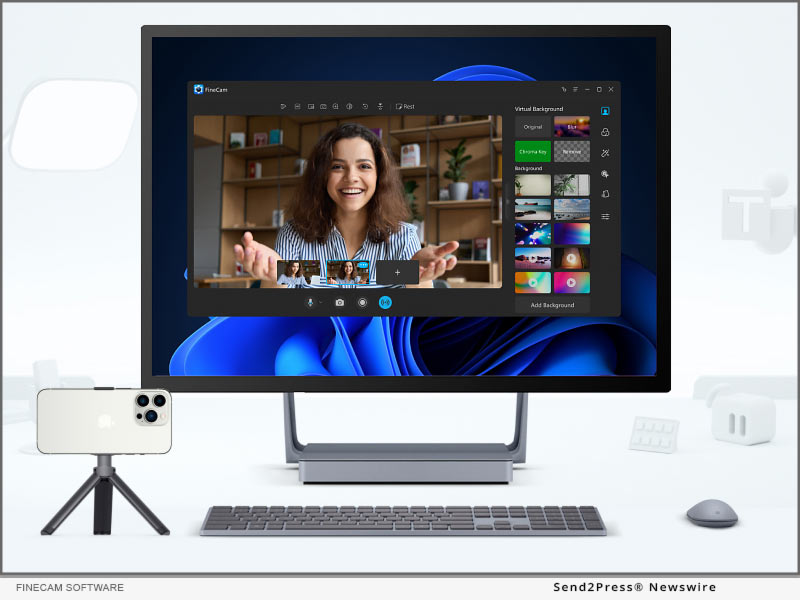
FineShare Co., Ltd., a young company committed to building easy-to-use apps, announced FineCam, the go-to webcam software that helps enhance webcam quality with backgrounds, filters, and effects, working for all popular video calling and streaming apps like Zoom, Microsoft Teams, Twitch, OBS, etc. With FineCam for iOS app, it's even possible to bring Apple's Continuity Camera feature to Windows PC.

Related link: https://www.fineshare.com/

This version of news story was published on ScoopCloud™ (ScoopCloud.com) - part of and © the Neotrope® News Network - all rights reserved.