Tag Archives: Windows 11 Data recovery

How to Recover Deleted Files on Windows 11 with 4DDiG Windows Data Recovery

NEW YORK, N.Y. /ScoopCloud/ -- There is a brand new and exciting "Halloween on Sale" introduced by Tenorshare 4DDiG, the industry-leading data recovery solutions provider. Users can take advantage of a 40% discount on the 4DDiG Windows 11 data recovery software during this sale.

"Have you accidentally deleted files on Windows 11? Fret not. You can recover deleted files on Windows 11 in just three easy steps with 4DDiG Windows Data Recovery software," said Tenorshare's spokesperson. "On top of that, with 4DDiG, we make it possible to restore your precious data in its original format in an affordable way."

How to Recover Deleted Files on Windows 11?

The majority of Windows 11 users around the globe have found the 4DDiG Data Recovery tool is helpful for their cause. This all-inclusive software consists of a modern AI algorithm that scans deeply to instantly recover deleted files on Windows 11.

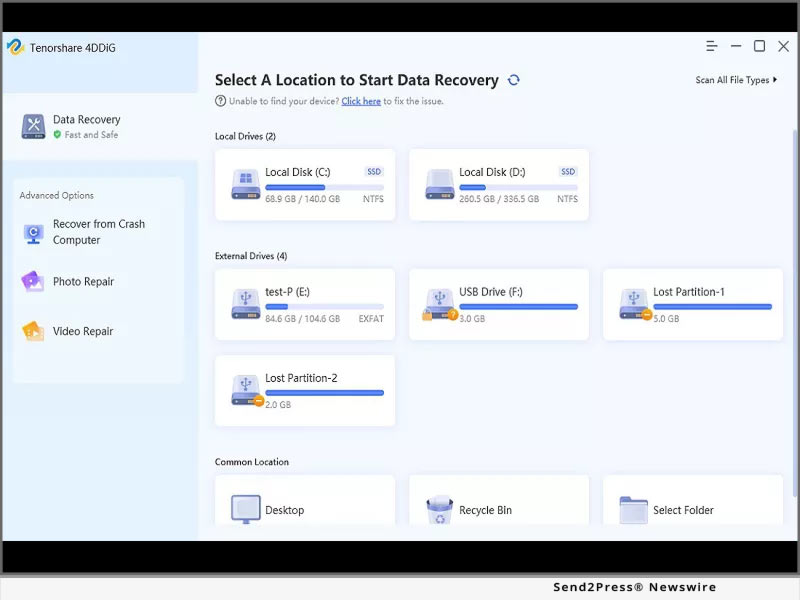
If you want to retrieve lost files from windows 11 or windows 10, no matter how you lost your files, by shift+delete, or after windows update, download and install 4DDiG on your device. Next, launch the tool to select the drive where you lost the data. Choose the Scan button, and the tool will start scanning for deleted files.

Once the scan is completed, you can preview files and choose Recover for the recovery process. Afterward, Export the recovered files in a safe place.

Features of 4DDiG Windows 11 Data Recovery

The numerous features of 4DDiG make it a highly professional Windows 11 data recovery tool. Let's explore them.

1 - Supports Various Devices Data Recovery

Regardless of your device, 4DDiG can effortlessly recover deleted files from Windows 11. Such as from external and internal devices, encrypted drives, SD cards, USBs, recycle bin, and digital cameras.

2 - Supports Over 1000+ File Types of Data Recovery

4DDiG can recover 1000+ formats, including documents, audio, video, and photo files. It is compatible with all Windows 11 supported file types.

3 - Supports Different Scenarios of Data Recovery

Besides retrieving deleted files on Windows 11, 4DDiG supports data recovery in different scenarios. It can recover files due to a virus attack, crashed system, formatting, corruption, or lost partition.

About 4DDiG Data Recovery

Tenorshare 4DDiG Data Recovery is an all-in-one solution for both beginners and professionals to repair and recover deleted files on Windows 11. No matter what data you've lost and how you've lost it, this tool supports all kinds of devices and file formats.

Anyone can recover deleted files on Windows 11 with our all-in-one Tenorshare 4DDiG Data Recovery solution at an affordable price. Quickly grab this tool from the official 4DDiG site and retrieve your valuable data at a high recovery rate.

LEARN MORE: https://4ddig.tenorshare.com/windows-data-recovery.html

Follow Us:

Facebook: https://www.facebook.com/4DDiG/

Twitter: https://twitter.com/Tenorshare4DDiG

MULTIMEDIA (YouTube): https://www.youtube.com/watch?v=VDs7IvyuXkE
News from Tenorshare Co. Ltd.

There is a brand new and exciting "Halloween on Sale" introduced by Tenorshare 4DDiG, the industry-leading data recovery solutions provider. Regardless of your device, 4DDiG can effortlessly recover deleted files from Windows 11. Such as from external and internal devices, encrypted drives, SD cards, USBs, recycle bin, and digital cameras.

Related link: https://www.tenorshare.com/

This version of news story was published on ScoopCloud™ (ScoopCloud.com) - part of and © the Neotrope® News Network - all rights reserved.
Remo Recover 6.0 is Here: Remo Software Launches its Most Powerful Data Recovery Software

BANGALORE, India /ScoopCloud/ -- Data Recovery has evolved, and so have the data loss scenarios. In response to rising data loss concerns, Remo Software, a leader in the data recovery industry, has released the latest version of their most popular and recognized product, Remo Recover.

The all-new Remo Recover 6.0 is here.

Data Recovery made simple, safe and quicker: This one line can sum up everything about the new version of Remo Recover 6.0. There is a lot to unpack in this new version:

Intuitive User-friendly UI: The upgraded user interface entirely focuses on simplifying the user journey and the application has been designed to make it even more simple and quick to use.

The new home screen allows the user to customize the data recovery process right at the beginning by specifying preferred location recovery. The user can choose either the drive or a specific folder or even a specific file type that he is looking for before hitting that scan button.

Auto Dual Scan: Remo Recover 6.0 gets a new upgrade to its powerful scan mechanism ensuring complete data recovery without any user intervention. This means as soon as the Quick scan is completed the software starts Deep Scan to recover more files from the drive.

Recover While You Scan: Unlike its predecessor, the users need not wait for the scan to complete to recover data in Remo Recover 6.0. You can start recovering data even when scanning is in progress, this saves huge time to users.

Much Smarter: The smart filters and advance search feature will make the process of finding the files during recovery a walk in the park even for a novice user. The user can preview the file for free and recover them only after judging the recovery quality.

More upgrades to Remo Recover 6.0 include:

* Support for more than 500 plus file types like photos, videos, documents etc.,

* Support for data recovery from more than 1000 plus storage devices like hard drives, SD cards, SSDs, USB etc.

* Rigorous testing under more than 100 real time data loss scenarios.

* Designed to perform consistently across all versions of Windows including latest Windows 11

You can check the all new Remo Recover 6.0 for Windows here: https://www.remosoftware.com/remo-recover-windows

About Remo Software:

Remo Software, since 2011 has been a prominent figure in the data recovery and data management sector whose contribution has impacted many users in making their digital life easy. With a proud portfolio of more than 33 quality software applications for Windows, Mac, Android and iOS, Remo Software has its footprints across the globe in more than 106 countries. Rated highly for its simplicity and being a Microsoft Gold partner only adds a feather to their high quality and safe to use products.

Learn more about Remo Software: https://www.remosoftware.com/

News from Remo Software

Data Recovery has evolved, and so have the data loss scenarios. In response to rising data loss concerns, Remo Software, a leader in the data recovery industry, has released the latest version of their most popular and recognized product, Remo Recover. The all-new Remo Recover 6.0 is here.

Related link: https://www.remosoftware.com/

This version of news story was published on ScoopCloud™ (ScoopCloud.com) - part of and © the Neotrope® News Network - all rights reserved.
Tenorshare 4DDiG 8.1.1 offers Recover and Repair All-in-One

NEW YORK, N.Y. /ScoopCloud/ -- Losing data from time to time is a common problem that many individuals face. Data recovery processes have become important as a result of this problem. A survey shows that 50 percent of the users had lost data when they tried to install the updates of Windows 11. To cater to this data loss problem, 4DDiG launched a new version named 8.1.1. This version is highly compatible with Windows 11.

What's New:

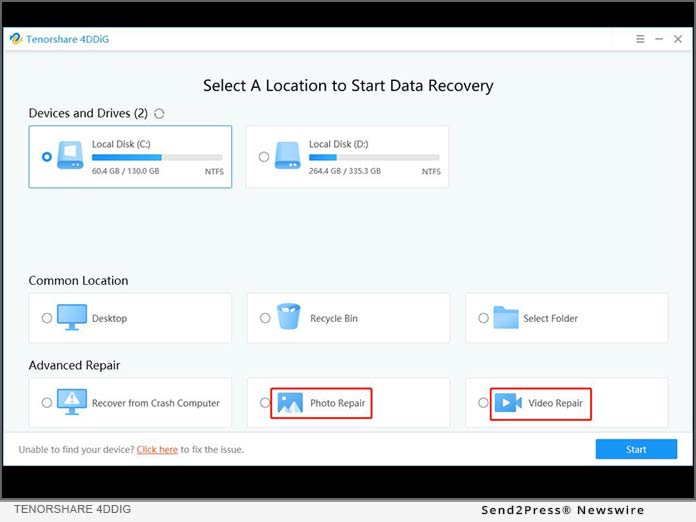
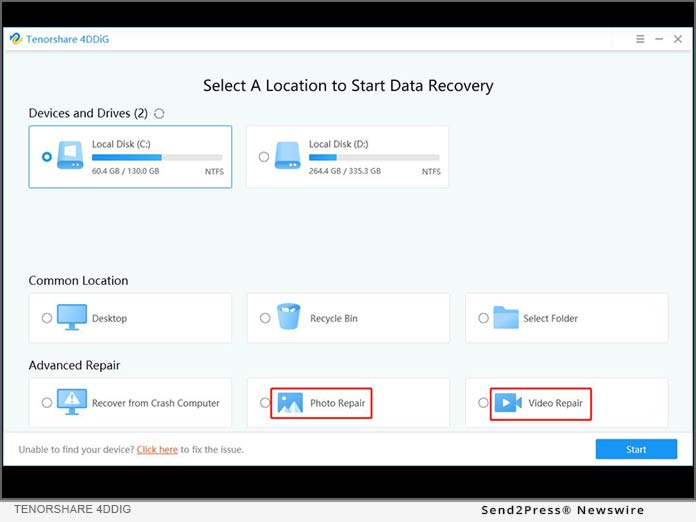
* Adding the Video Repair function for making the video repair process easy and quick for the users. This function can be found on the software homepage.

* The addition of the Photo Repair function is for enabling quicker and easier recovery of the photographs. This function is also available on the homepage of the software.

* Increasing the new functions can repair blurred pictures during the scanning process. In simple words, when 4DDiG scanning users device, once blurred pictures were found, it wound automatically repaired it to a high-quality one.

With the help of this new version launched by Tenorshare 4DDiG, one can recover photos, videos, audios, emails, office documents, and other types of data that have been accidentally erased due to formatting or virus-attack and other problems.

Tenorshare 4DDiG 8.1.1 is Fully Compatible with Windows 11

Updating to Windows 11 are become more and more popular. But since Windows 11 OS was released, some users found their files are disappeared, with 4DDiG 8.1.1, users can easily recover all their lost files after updating to Windows 11.

Learn more at: https://4ddig.tenorshare.com/windows-fix/recover-files-after-windows-11-update.html

About 4DDiG

Tenorshare 4DDiG Data Recovery Software supports various types of file recovery, including photos, videos, music, documents like Word, PPT, PDF, Excel, and so on. Besides 4DDiG supports many different scenarios including accidental deletion, partition, formatting, etc.

With the technology development, 4DDiG Data Recovery has become an all-in-one solution to perform data recovery for all scenarios. 4DDiG data recovery also supports both Windows and macOS. It also supports various languages, be like English, German, French, Italian, Spanish, Portuguese, Russian, Japanese, Arabic, etc.

Learn more at: https://4ddig.tenorshare.com.html/

To know more about the new version, follow Tenorshare 4DDiG's social media handles:

Facebook: https://www.facebook.com/TenorshareOfficial/

Twitter: https://twitter.com/Tenorshare

YouTube: https://www.youtube.com/channel/UCQZ9C1IzQB1bgMXmGw7s5bw

News from Tenorshare Co. Ltd.

Losing data from time to time is a common problem that many individuals face. Data recovery processes have become important as a result of this problem. A survey shows that 50 percent of the users had lost data when they tried to install the updates of Windows 11.

Related link: https://www.tenorshare.com/

This version of news story was published on ScoopCloud™ (ScoopCloud.com) - part of and © the Neotrope® News Network - all rights reserved.