Tag Archives: AI video upscaling

Cisdem Upgrades its Video Converter with AI Enhancer: Turn Blurry Video into 4K Quality

NEW YORK, N.Y. and HONG KONG, Oct. 14, 2025 (SEND2PRESS NEWSWIRE) — Cisdem has released a significant update to its popular Video Converter, introducing AI-powered video upscaling and intelligent noise reduction. The new version boosts video resolution to 4K/8K while making footage cleaner in the AI module. It also adds support for preserving source-quality audio in the conversion module and delivers underlying optimizations for smarter, more reliable performance.
Cisdem Upgrades Video Converter with AI Enhancer: Turn Blurry Video into 4K Quality
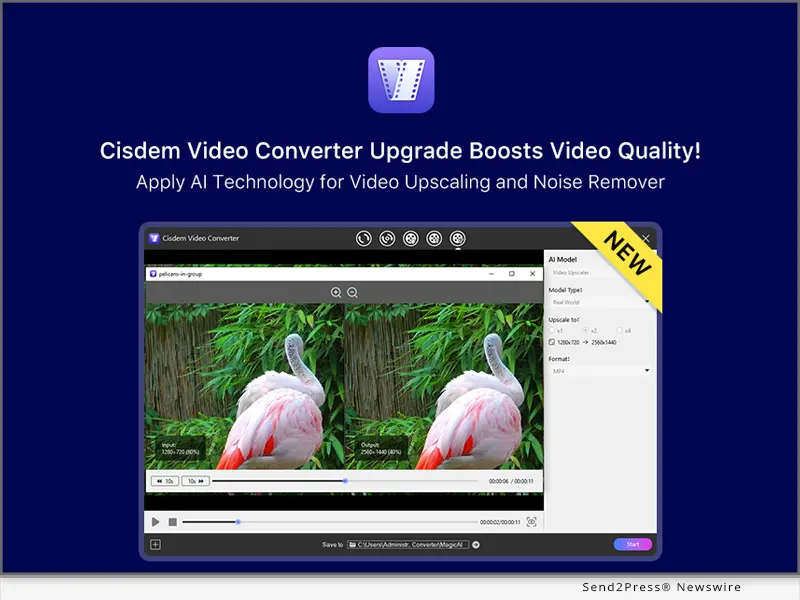
Image caption: Cisdem Upgrades Video Converter with AI Enhancer: Turn Blurry Video into 4K Quality.

MEET CISDEM VIDEO CONVERTER

Cisdem Video Converter is an all-in-one yet easy-to-use media file processing tool to enhance, convert, edit, compress, merge, and play videos on Windows and Mac. The app includes 5 modules to ensure that every frame is finely enhanced, each supporting fast batch processing except for the AI module. Before enhancement, users can also trim, crop, rotate, add chapters, subtitles, and watermarks to the video.

BEHIND THE SCENES OF THIS UPGRADE

“Adding the AI module was simple in purpose – to make video enhancement accessible to everyone,” said Jeffrey Berry, Project Lead of Cisdem Video Converter. “Some of our users, especially older adults, struggled with vintage pixelated videos. So instead of complicating the technology, we focused on one-click enhancement to upscale blurry footage and remove video noise.”

He added: “The R&D and QA teams tested hundreds of video samples together to strike a balance between quality and processing speed. Finally, we succeeded in embedding a simple and professional AI model for Video Converter.”

WHAT’S NEW IN CISDEM VIDEO CONVERTER

  1. AI Video Upscaler
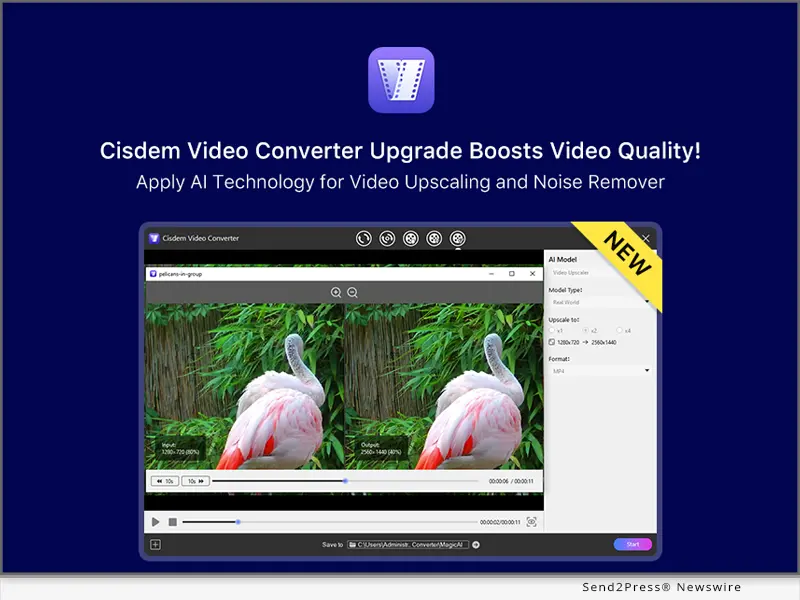
    Two model types are available to intelligently enhance details in old, low-quality videos and maintain smooth motion in animated content. Choose from 1x (original), 2x, or 4x resolution upscaling as needed.
  2. AI Video Noise Remover
    The advanced AI-driven noise reduction algorithm effectively removes video flaws such as clearing grain, reducing flicker in low light, and fixing compression artifacts.
  3. Quick Preview
    Preview AI-enhanced video before final export. Intuitively compare the differences between the original and processed videos, with the ability to zoom in to see details.
  4. Format Options in the AI Module
    Videos processed by AI can be saved in MP4 (universal), MOV (Apple-friendly), or WebM (web-optimized). Users can pick an appropriate format based on different use cases.
  5. Preserve the Original Audio Quality
    In the conversion module, the “Same as source” output option is provided for common audio formats, which maintains the original parameters and avoids quality loss.

Learn more: https://www.cisdem.com/video-converter.html

COMPATIBILITY AND PRICE

Cisdem Video Converter works with Windows 11/10/8/7 (64-bit) and macOS 10.15 or later. Pricing starts at $49.99/year and $69.99/lifetime.

Users can download and try Cisdem Video Converter for free.

Windows version: https://download.cisdem.com/cisdem-videoconverter.exe

Mac version: https://download.cisdem.com/cisdem-videoconverter.dmg

ABOUT CISDEM

Since 2014, Cisdem has created multiple innovative and highly efficient software in the fields of Utility Tools, Multimedia Studio, and PDF Solutions. Cisdem apps, known for simple and user-oriented design, have been used by individual and business users in more than 160 countries.

Learn more: https://www.cisdem.com/.

YouTube: https://www.youtube.com/@CisdemInc/

X: https://x.com/CisdemStudio

Facebook: https://www.facebook.com/cisdemsoftware

Instagram: https://www.instagram.com/cisdem_official/

NEWS SOURCE: Cisdem Inc


This press release was issued on behalf of the news source (Cisdem Inc), who is solely responsible for its accuracy, by Send2Press Newswire. Image, if any, was provided by the news source and not this website or the wire service. Information is believed accurate, as provided by the news source, but is not guaranteed.

To view the original story, visit: https://www.send2press.com/wire/cisdem-upgrades-its-video-converter-with-ai-enhancer-turn-blurry-video-into-4k-quality/

Copr. © 2025 Send2Press® Newswire, Calif., USA. -- REF: S2P STORY ID: S2P130121 NOREL-3B

 

UniFab All-In-One software launches latest update to comprehensively improve audio and video processing experience

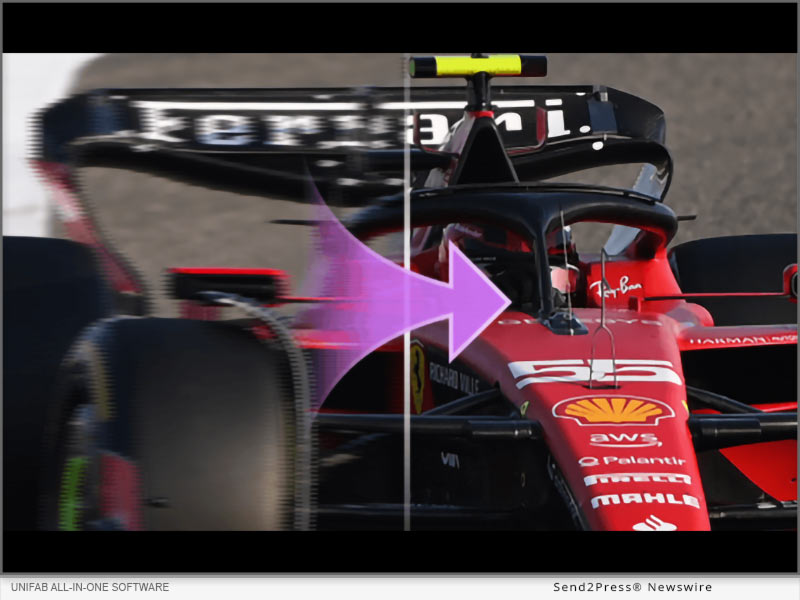
NEW YORK, N.Y. /ScoopCloud/ -- UniFab announced the release of its latest version. The new function UniFab Vocal Remover AI is launched in the latest version. This function supports intelligent separation of vocals and background music in a variety of video and audio files, and the launch of the UniFab All-In-One version for Mac systems, including 4 AI video processing modules and video format converter.

UniFab All-In-One software has always been committed to providing users with the highest quality audio and video processing experience. The latest update further improves the functionality and performance of the software, bringing users more convenient and efficient processing methods.

First, UniFab All-In-One adds a new function module, UniFab Vocal Remover AI. This function supports intelligent separation of vocals and background music in a variety of video and audio files. Users can adjust the output file format according to their own needs, providing more choices. The addition of this function makes audio processing more convenient and meets user needs for different audio elements.

Secondly, UniFab has launched the UniFab All-In-One version for Mac systems, which includes 4 AI video processing modules and a video format converter.

UniFab Video Converter supports the conversion of multiple video formats and is perfectly compatible with different devices, allowing users to enjoy high-definition videos anytime and anywhere.

UniFab Denoise AI uses AI technology to remove noise in videos while restoring details and improving video quality.

UniFab Video Upscaler AI can upscale video resolution to 4K, enhancing video clarity and quality.

UniFab Smoother AI increases the video frame rate to 120FPS to achieve smooth motion effects.

UniFab Deinterlace AI can remove interlacing from videos, eliminate motion artifacts and edge blur, and improve the video viewing experience.

UNIFAB ALL-IN-ONE FUNCTIONS AND FEATURES

1. Upscale videos to HDR and Dolby Vision for superior video quality.

2. Improve the quality of every type of video without changing the resolution, such as low-resolution TV series, black and white movies, homemade videos or animations.

3. Eliminate video noise caused by low-light conditions, camera malfunctions, signal interference during transmission and compression algorithms.

4. Use AI technology to smoothly upgrade SDR to the HDR10 standard to achieve more realistic and vivid color presentation.

5. Upscale video resolution to 4K for ultra-sharp images. It seamlessly upscales video resolutions to 720p, 1080p and 4K Ultra HD

6. Audio is mixed to DTS 7.1 and EAC3 5.1 via AI for superior surround sound quality, enhancing the user's viewing experience and providing an immersive audio environment.

7. Increases frame rate to 120 fps to reduce judder and judder, delivering more natural results for the ultimate viewing experience.

8. Use AI to deinterlace videos for playback on the latest devices and improve your viewing experience using advanced AI technology.

9. Losslessly convert videos to more than 1,000 formats including MP4, MKV, AVI, WMV, and more for device compatibility and support without losing quality.

10. Compress video and audio while retaining original quality for sharing on social media platforms.

11. Edit videos professionally with tools like split, crop, rotate, flip and mirror, set duration and adjust video speed to create special effects.

The R&D team of UniFab software stated that they will continue to iteratively update the software, add more convenient and practical functions, and provide users with more complete video editing tools.

For more information please visit the official website:

English: https://unifab.ai/

Japan: https://ja.unifab.ai/

MULTIMEDIA:

VIDEO (YouTube): https://www.youtube.com/watch?v=8tNAW22a0ug

News from UniFab

UniFab announced the release of its latest version. The new function UniFab Vocal Remover AI is launched in the latest version. This function supports intelligent separation of vocals and background music in a variety of video and audio files, and the launch of the UniFab All-In-One version for Mac systems, including 4 AI video processing modules and video format converter.

Related link: https://unifab.ai/

This version of news story was published on ScoopCloud™ (ScoopCloud.com) - part of and © the Neotrope® News Network - all rights reserved.

HitPaw Launches Mac Version of Video Enhancer to Improve the Video Quality

NEW YORK, N.Y. /ScoopCloud/ -- HitPaw, a company provides the best digital creation tools, today releases the video enhancement software - HitPaw Video Enhancer Mac. Utilizing artificial intelligence (AI), HitPaw Video Enhancer Mac upscales videos automatically for a variety of uses and provides a novel way to lessen noise, pixels, and overexposure brought on by subpar cameras and poor lighting.

HitPaw Video Enhancer Mac provides three popular models, including General Denoise Model, Animation Model, and Face Model. HitPaw Video Enhancer will automatically make the identical modifications that professional editors would do. All modifications will also be included right into the rendering pipeline.

* General Denoise Model

Each pixel in films shot with low-quality, low-light cameras will have very little light, increasing blurriness and clarity. HitPaw Video Enhancer Mac is able to provide a clean and bright result by lighting each pixel up in the video using the General Denoise Model.

* Animation Model

There are a bunch of timeless and unbeatable anime videos that are becoming hazy and colorless with the advancement in resolution. The goal of Animation Model is to fix anime videos by sharpening and coloring the anime characters to make them appear more realistic and lively on high-quality screens.

* Face Model

In general, and especially for a novice or green hand, adjusting portrait characteristics in films is more difficult and time-consuming than in photos. HitPaw Video Enhancer Mac can modify the brightness, color saturation, and contrast of the portraits in every frame by learning from a vast number of samples.

Apart from three AI Model, HitPaw Video Enhancer Mac also supports:

* More than 30 video formats, including MP4, AVI, RMVB, and MKV

* Up to 4K exported resolution

* Batch processing

* MP4 and MOV format exported

Compatibility and Price:

HitPaw Video Enhancer is now compatible with Mac OS 10.15 & above and Windows 11/10(64-bit OS). The price of Mac version starts from $59.99 USD for a monthly plan. For more price checking and information, you can visit https://www.hitpaw.com/purchase/buy-hitpaw-video-enhancer-mac.html

About HitPaw:

HitPaw is an emerging software company specialized in video editing, screen recording, watermark removing, image editing, photo enhancing meme-making, etc. We help users turn their inspiration into reality so that we can generate more ideas to make the world full of more creativity.

To know more, you may visit https://www.hitpaw.com/about.html and https://www.hitpaw.com/

Our Social Media:

YouTube: https://www.youtube.com/channel/UCQwRggaotgiMcPbiCOsJeBA

Facebook: https://www.facebook.com/hitpawofficial/

Twitter: https://twitter.com/HitPawofficial

Instagram: https://www.instagram.com/HitPawofficial/

Pinterest:  https://www.pinterest.com/hitpawvideoeditor/

News from HitPaw

HitPaw, a company providing the best digital creation tools, today releases the video enhancement software - HitPaw Video Enhancer Mac. Utilizing artificial intelligence (AI), HitPaw Video Enhancer Mac upscales videos automatically for a variety of uses and provides a novel way to lessen noise, pixels, and overexposure brought on by subpar cameras and poor lighting.

Related link: https://www.hitpaw.com/

This version of news story was published on ScoopCloud™ (ScoopCloud.com) - part of and © the Neotrope® News Network - all rights reserved.