Tag Archives: backup software

Celebrate World Backup Day 2022 with Tenorshare 4DDiG and Get Up To 30% OFF

NEW YORK, N.Y. /ScoopCloud/ -- World Backup Day, celebrated on March 31, is a day to remind you that you should regularly back up your files and documents. In a matter of seconds, you can lose all of your data and not be able to recover it. With today's technology, backing up your gadgets has never been easier and faster. However, accidents do happen, and now you will need a professional data recovery software to help - Tenorshare 4DDiG.

What's 4DDiG?

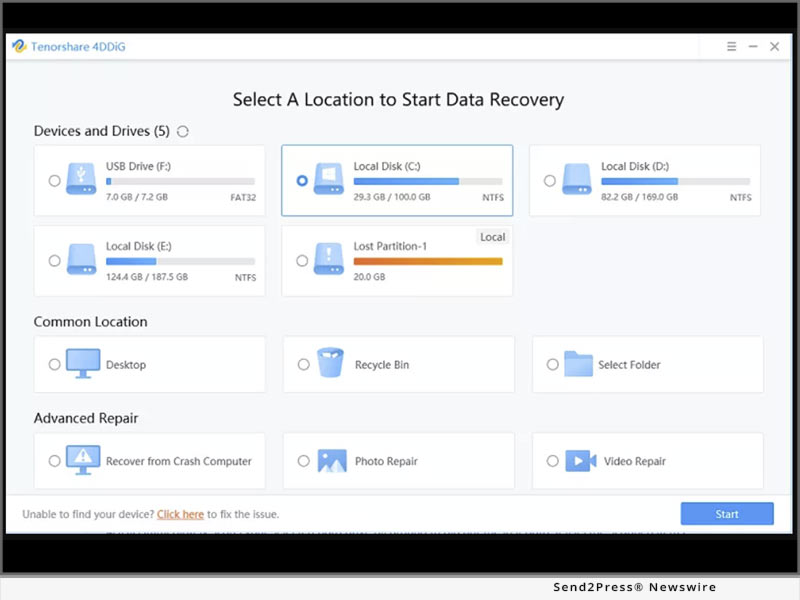
Tenorshare 4DDiG is a professional data recovery software for both Windows and Mac users. No matter whether you want to recover data from your local computer or external hard drive, 4DDiG will be your second to none choice to recover your lost data.

4DDiG Key Features:

1 -- Supports data recovery 1000+ file types, be like word, PPT. Excel, PDF, music, photos, and so on

2 -- It can recover data from SD card, Hard drive, USB, External hard drive, digital camera, PC, and so on

3 -- No technical needs, within 3 easy clicks, users can get they lost data back

4 -- 4DDiG can recover lost files due to accident deletion, formatting, corruption, and so on

4DDiG Special Offers:

1 -- Share your backup story with us on Facebook/Twitter/Instagram, then you can get the $10 coupon code!

2 -- To celebrate World Backup Day 2022, everyone can get 30% OFF to enjoy the professional data recovery tools

Conclusion:

Make sure you back up all of your devices on World Backup Day 2022, as the day was meant to be. Set a reminder to do it more frequently, rather than just once a year. Backing up your data gives you not only peace of mind but also the opportunity to review and reminisce over your saved images and memories from the past. But if you do lost data without backup, you can try Tenorshare 4DDiG data recovery software.

For more information, visit https://4ddig.tenorshare.com/world-backup-day-2022.html

Follow on Social:

Facebook: https://www.facebook.com/4DDiG/

Twitter: https://twitter.com/Tenorshare4DDiG

Instagram: https://www.instagram.com/tenorshare_4DDiG/

MULTIMEDIA:

VIDEO (YouTube): https://youtu.be/C_bABjvZP9w
News from Tenorshare Co. Ltd.

World Backup Day, celebrated on March 31, is a day to remind you that you should regularly back up your files and documents. In a matter of seconds, you can lose all of your data and not be able to recover it. With today's technology, backing up your gadgets has never been easier and faster. However, accidents do happen, and now you will need a professional data recovery software to help - Tenorshare 4DDiG.

Related link: https://www.tenorshare.com/

This version of news story was published on ScoopCloud™ (ScoopCloud.com) - part of and © the Neotrope® News Network - all rights reserved.

ScoopCloud Newswire

EaseUS Releases Newly Designed Mac Backup App – Todo Backup for Mac

CHENGDU, China /ScoopCloud/ -- EaseUS has revealed an exciting innovation with its newly designed Todo Backup for Mac to keep MacOS data safe from threats. With long term research and development, EaseUS' brand new Mac backup software covers advanced backup and disaster recovery features that are vital and handy for data security.

Move documents to Trash accidentally without backup? Experience an unexpected shutdown on Mac and lose important files? MacBook or iMac is suddenly attacked by ransomware or malware? Risks of data loss spread across everywhere. Millions of devices are stuck on non-protected operating systems.

However, how to fix it or save data from such destructive disaster? To back up Mac regularly is the best practice to address information security. EaseUS Todo Backup for Mac follows an innovative philosophy to make full copy of data in a simple way and has a fast access to restore everything back to original state in case of further damage.

Before things go wrong, in fact backup on Mac is only an insurance plan to protect critical documents, photos, emails, music, videos, audios or anything that matters. Of course, there are other similar methods to deal with data protection difficulties, like cloning disks along with saved data to another one or synchronizing files among different locations without physical data migration that possibly causes serious data loss.

This all-in-one Mac backup solution involves backup archive, disk cloning and file sync features for complete data protection. What's more, all things that matter data security on Mac can be done automatically as backup schedules are reasonably set up at the first stage.

EaseUS new backup software for Mac has an advantage over Time Machine backup - a built-in function under macOS Sierra or previous Mac OS X on flexibility that caters to the majority of demands from Mac users. To get ready for any emergency like privacy leak, it comes with backup encryption that only allows specified administrator with privilege an access to key information. Besides, backup file compression saves much disk space to make better Mac performance.

EaseUS Todo Backup for Mac 3.3.3 is now available at: http://www.easeus.com/backup-software/todo-backup-mac.html

About EaseUS Software:

EaseUS provides professional IT solutions for home, education and SMB users, service providers in data recovery, backup, system optimization and partition manager on both Windows and Mac platforms. Founded in 2004, EaseUS has established itself as a fast-growing international company with over 100 million wonderful users in the world. For more information, please visit http://www.easeus.com.

"EaseUS" is registered trademark of CHENGDU Yiwo Tech Development Co., Ltd.

EaseUS has revealed an exciting innovation with its newly designed Todo Backup for Mac to keep MacOS data safe from threats. With long term research and development, EaseUS' brand new Mac backup software covers advanced backup and disaster recovery features that are vital and handy for data security.

This version of news story was published on ScoopCloud™ (ScoopCloud.com) - part of the Neotrope® News Network - all rights reserved.

ScoopCloud Newswire

AOMEI System Backup Is An All-Round Solution, Not Just as OS Protection But as Much More

NEW YORK CITY, N.Y. /ScoopCloud/ -- AOMEI Technology, the easiest backup service provider, offers the best free system backup solution - AOMEI Backupper. It will automatically include the necessary system and boot files in the backup image to ensure a secure restore to computer with similar and dissimilar hardware. Now, AOMEI Backupper has reached over 10 million happy users and the number is continuously growing.

"System backup has never been this simple and straightforward," Noozil Lander from Auckland said, "For many years I used Ghost to backup my Windows systems. It would drive me crazy when it stopped functioning without explanation. I discovered AOMEI Backupper some years ago and have never looked back. The logic of the interface is easy to follow. I love the Explore Image utility! It's fast and accurate. Believe me when I say it's been a repeated lifesaver."

When you finish installing Windows 10, 8, or 7 with frequently-used programs, it is recommended to create a system image as you will never know when an unexpected issue happens, like system crash, virus attack, hardware failure, etc. With a system backup, you can restore system to earlier date and all the program and settings will be as the state when the backup was created.

When you want to upgrade to a larger hard drive or a faster SSD, you can backup your system to an external hard drive and then boot from AOMEI Bootable Media to restore system image to the new drive so as to migrate OS to SSD without reinstalling Windows and applications.

Besides saving your system from crash, a system backup image can also be used to deploy a well configured system to multiple computers including those with dissimilar hardware. This is really helpful if you manage a lot of computers and want to upgrade their operating system.

As the easiest PC backup software, AOMEI Backupper has many advantages over Windows built-in Backup and Restore tool. It is much faster and secure because it uses block-by-block backup instead of file-by-file; it will compress the backup image file by default (high compression option is also available) to save backup disk space; it can keep many scheduled backup tasks instead of only one.

For making the system backup more efficient, AOMEI Backupper provides advanced automatic backup followed by incremental backup or differential backup. A system backup can be triggered at a specific time in daily, weekly, monthly or on a specific event.

Some additional features to make the backup go smooth:
* Notify you via email when a backup is performed.
* Add encryption for backups.
* Compress backup image for saving disk space.
* Split image to multiple into multiple smaller ones.

Learn more at: http://www.backup-utility.com/professional.html.

About AOMEI Technology:

Found in 2009, AOMEI has released many free tools including AOMEI Partition Assistant, AOMEI Backupper, MultCloud, AOMEI OneKey Recovery, and AOMEI Image Deploy to help individuals and organizations. For more information, visit: http://www.aomeitech.com.

AOMEI Technology, the easiest backup service provider, offers the best free system backup solution - AOMEI Backupper. It will automatically include the necessary system and boot files in the backup image to ensure a secure restore to computer with similar and dissimilar hardware. Now, AOMEI Backupper has reached over 10 million happy users and the number is continuously growing.

This version of news story was published on ScoopCloud™ (ScoopCloud.com) - part of the Neotrope® News Network - all rights reserved.

ScoopCloud Newswire

Are You Prepared for the 2017 World Backup Day? Don’t be an April Fool

NEW YORK, N.Y. /ScoopCloud/ -- This Friday, March 31, 2017 is the yearly World Backup Day. As the easiest backup service provider, AOMEI Technology is very pleased to remind you to backup data in advance in case of any unexpected issues. These days, 5,000 computers get stolen or lost in USA, one out of ten computers infected with virus every month, nearly one-third of data disasters caused by accident, and over ninety percent of computer users have experienced hardware failure. Therefore, anyone and any company should have a backup plan to protect their precious data before it is too late.

"I thought backup was really complicated and tedious. I would never need it," John D. Kelley from New York said. "But then I realized I should have done it on a regular basis when my system crashed and all my important documents lost. The truth is creating backups is easy and I only need to set it up once."

You should never leave your data unprotected. You need backup software to protect your personal and business documents; memorable pictures and photos; audio and video recordings; system and applications. The things that you cannot live without or would take you much time retrieving need to be included in your "backup plan." Imagine if you suddenly lose all of this stuff.

Many devices and services can be used as a backup location. Keeping only one copy of backup may not be enough.

You can keep multiple backups to the following locations:
* Internal storage: HDD, SSD, SSHD.
* External storage: External hard drive, USB flash drive, SD card.
* Network storage: NAS devices, network shared folder.
* Online storage: Cloud drives.

With AOMEI Backupper, you only need to configure a scheduled backup once and it will continually create backups on a specific event or time. In order to save backup disk space and time, you can also choose to create an incremental backup or differential backup along with full backup. A backup without testing is no backup at all. When a backup is complete, you can use Check Image feature to see if the backup is integrated.

On this special day, get started to backup your data with AOMEI Backupper Free Edition. Download this freeware: http://www.backup-utility.com/free-backup-software.html

AOMEI Backupper Paid Editions are on sale. The discount is up to 50-percent OFF. To grab this special offer, please visit: http://www.backup-utility.com/landing/world-backup-day-sales-2017.html.

About AOMEI Backupper:

AOMEI Backupper is a backup software that allows you to backup files, partitions, disks and system easily into an image file. Once data loss or system crash happens, you can restore them back. If your computer hardware fails, you can also restore the system to another computer with dissimilar hardware. Besides backup functions, AOMEI Backupper also provides hard drive clone and file sync feature to help you protect your data.

Learn how AOMEI Backupper works, please visit: http://www.backup-utility.com/features/index.html

This Friday, March 31, 2017 is the yearly World Backup Day. As the easiest backup service provider, AOMEI Technology is very pleased to remind you to backup data in advance in case of any unexpected issues. These days, 5,000 computers get stolen or lost in USA, one out of ten computers infected with virus every month, nearly one-third of data disasters caused by accident, and over ninety percent of computer users have experienced hardware failure.

This version of news story was published on ScoopCloud™ (ScoopCloud.com) - part of the Neotrope® News Network - all rights reserved.