
Tag Archives: video repair

Joyoshare VidiKit Updated to Repair, Compress and Watermark Videos

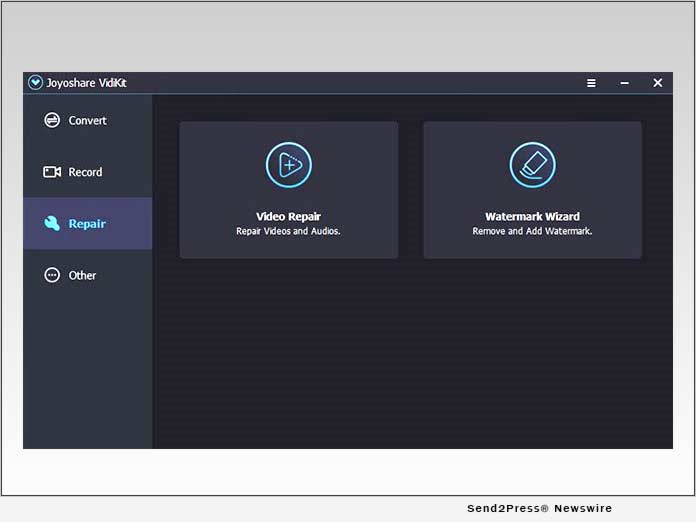
HONG KONG /ScoopCloud/ -- Joyoshare Studio, one of the most prominent multimedia developers, has recently launched a major update for the public to its all-in-one video toolkit - Joyoshare VidiKit. In the new release, both Windows and Mac users can enjoy stunning features, including video repair, video compression, watermark removal and adding, to efficiently fix broken videos, manage large files and initiate post-production.

Video Repair: In the new update of Joyoshare VidiKit, any user is able to repair various corrupted videos easily with a high success rate, such as video is choppy, frozen, stuttering, sluggish, grainy, pixelated, jerky, no sound, audio out of sync, not playing, black screen, etc. With the parallel task setting, it even perfectly fixes multiple broken videos and audios at the same time. More than that, this video repair software can well support files that're damaged during different scenarios, like recording, conversion, downloading, editing and more.

Video Compressor: Want to get rid of the hassle of not sharing a video on social media because the file is too big? Resort to Joyoshare VidiKit to effectively compress videos now! With advanced file compression technology, it's equipped with 40X faster speed than traditional tools. Users are entitled to compress by percentage or by file size according to personal preferences. There are a huge array of formats it supports, including MP4, FLV, ASF, VOB, MPEG, AVI, MP3, MKV, 4K, etc. To reach an optimal compression result, you can additionally preview before saving videos.

Watermark Wizard: After the update, Joyoshare VidiKit makes it possible to magically remove watermarks from videos and photos. It also gives access to intelligently add custom watermark text or watermark image, considering that users have strict copyright awareness. In order to provide maximum convenience for you to edit the watermark, batch processing is featured in this superior software. Handily, you can furtherly benefit from its preview, classification and compare options to effortlessly check files.

Taking the increasing editing needs of multimedia users into account, Joyoshare specially added video repair, video compressor and watermark wizard to VidiKit. "There is no doubt that the availability of this update makes this video toolbox more excellent and complete in functionality," said James, Product Manager at Joyoshare. "Surely, Joyoshare won't be limited to the existing recording, conversion, and editing functions, we will continue to innovate and follow up the market trend to satisfy all users."

Price & Availability

Joyoshare VidiKit currently provides a subscription mode with automatic renewal, allowing users to freely cancel at any time. It's normally and reasonably priced at $19.95 for 1-PC one-month license with lifetime free support and update. There are more available license types, including $39.95 for 1-PC one-year license and $55.95 for 1-PC lifetime license. It even offers licenses for 2-5 PCs so that users can flexibly make selections based on personal requirements. Notably, this powerful video toolkit is applicable to Windows XP and later as well as Mac OS X 10.8 and later.

About Joyoshare

Joyoshare is a dedicated multimedia software developer and provider specialized in video field for years, which also expands its scope of business to iOS solutions. With advanced technologies and professional R&D team, Joyoshare keeps developing the best video, audio and iOS programs, including video cutter, screen recorder, video converter, watermark remover, video repair, iOS system recovery, iOS data recovery, iPhone passcode unlocker, etc. to customers all over the world. By offering considerate and high-quality service, Joyoshare has won high reputation online from millions of users over the past years. Learn more: https://www.joyoshare.com/

Contact:
Company: Joyoshare
Email: support@joyoshare.com
Phone Number: 23228786

Twitter: https://www.twitter.com/Joyoshare_Soft

Facebook: https://www.facebook.com/JoyoshareGlobal/

YouTube: https://www.youtube.com/c/JoyoshareSoftware

VIDEO: https://youtu.be/pGsVghGaZeM
News from Joyoshare

Joyoshare Studio, one of the most prominent multimedia developers, has recently launched a major update for the public to its all-in-one video toolkit - Joyoshare VidiKit. In the new release, both Windows and Mac users can enjoy stunning features, including video repair, video compression, watermark removal and adding, to efficiently fix broken videos, manage large files and initiate post-production.

Related link: https://www.joyoshare.com/

This version of news story was published on ScoopCloud™ (ScoopCloud.com) - part of and © the Neotrope® News Network - all rights reserved.
What are the top features of Wondershare Video Repair?

VANCOUVER, British Columbia /ScoopCloud/ -- Videos usually serve as a means for people to conserve memories that they count as precious to them, says Wondershare. Anyone could decide to record the video of a childbirth, birthday, graduation or just about any special event. Our videos are pretty important.

Due to this, it is painful when someone loses a video that is filled with memories. There are a variety of ways and reasons why a video can be lost from a device. It could be through personal error, device malfunctions or the video becomes a corrupted file. Regardless of how we lose our videos, there's always the urge to try and get them back.

When a video gets missing from a personal device, most people usually scamper online to look for different means to help them recover what has been lost. There are a lot of options to choose from online but which of them actually works to do what you want from them. It's too often that popular software online is incompatible with all video types or can't function properly on all devices. This usually left a void for most users to fill and the search for quality continues.

The Wondershare Video Repair is the answer to all your demands. In terms of effectiveness, Wondershare Video Repair ranks high when compared with other video recovery tools. This repair tool is designed to work with a variety of video formats and be compatible with numerous devices. It's the answer to what many users are looking for.

A Wondershare Video Repair is a tool used in video recovery Windows & Mac. This tool is a powerful one used by over 5 million users around the world and in over 160 countries. It was designed by recovery experts who have an extended record till 2003. Due to this, users can trust the quality of what they are being offered and recover all their favorite videos. It can be used to repair all types of corrupt or nonfunctional videos. This video repair tool has been touted as the best around the world because it is capable of fixing videos of a variety of formats including MOV, MP4, M4V, M2TS, MKV, MTS, 3GP, AVI and FLV. It doesn't matter if the video got corrupted during shooting, recording, transferring, editing, converting or processing; Wondershare can help you restore its contents. The versatility of the video repair tool is exactly what makes it so good. It can be used with a variety of devices and requires only a simple process to get it done.

The greatest thing about this tool is any video can be repaired in 3 simple steps;

Select - Choose the corrupt video(s) which you'll like to recover with the tool. Users may decide to choose one or more videos for recovery. There's no limit to the number of videos that can be chosen here.

Repair - Let the video repair tool do its work and repair the video(s) which you have selected. It can repair videos up to seven different formats.

Export - Preview the content of the repaired video and save it to the desired location. This feature can be useful to help confirm the contents of the video before saving it.

Learn more at: https://recoverit.wondershare.com/video-repair-tool.html

What are the features of the Wondershare Video Repair?

The Wondershare Video Repair tool is designed to have the following features;

* Capable of repairing corrupt videos on Windows such as MOV, MP4, M4V, 3G2, 3GP, WMV, ASF and FLV files.
* Capable of repairing corrupt videos on a Mac PC such as MP4, MOV, M4V, AVI and FLV files.
* Capable of repairing videos from any popular storage device such as cameras, GoPro, DJI Drones.
* Users enjoy a free preview of the file being recovered before it is saved permanently in the desired location.
* Can work on videos of any size or any number of videos i.e. no limitations by size or number.
* Capable of repairing Standard Definition, full HD and 4k resolution files.
* Can handle videos corrupted due to errors related to camera, errors when handling videos and other corruption cases.


What users are saying?

There are millions of people in different corners of the world who have used Wondershare to recover their favorite videos. Everyone usually has different reasons for using Wthe ondershare video repair tool but the end results are usually the same - quality video recovery. There are a variety of positive reviews on the use of the app and it seems like people can't just enough of it. The video repair tool truly offers quality. Let's take a look at reviews from other users.

Jack St. Pierre

Super easy to get all of my files back. Also really fast. I tried another program and it took three hours and had zero image previews. This made it so I could see what I wanted to recover and get my images back quickly and easily. definitely recommend!

Robert Farah

I had two HDD in RAW format and after I purchased the software it was easy to install as well as easy to recover all of my lost data. Great product and highly recommended to anyone who lost their data.

Akmam Nm

I was really worried about my files because I took a lot of effort to shoot those videos and while I was moving the files after moving them it just got deleted from my drive and I felt heartbroken with the help of recovery, I got all my files back a real lifesaver.

Chile

Literally saved 3years of work. My son accidentally deleted all my files on USB. Thank God I was able to recover most of it. The drawback, however, is that I had to rebuild the file tree hierarchy that was originally on the USB.

How to get it?

The Wondershare Video Repair tool is available for download online. For Mac users, it's available at $39.95 per month, $49.95 per year and $79.99 for r lifetime. For Windows users, it's available at $29.95 per month, $39.95 per year and $69.99 for lifetime.

Learn more at: https://recoverit.wondershare.com/video-repair-tool.html

News from Wondershare Inc.

Videos usually serve as a means for people to conserve memories that they count as precious to them, says Wondershare. Anyone could decide to record the video of a childbirth, birthday, graduation or just about any special event. Our videos are pretty important.

Related link: https://www.wondershare.com/

This version of news story was published on ScoopCloud™ (ScoopCloud.com) - part of and © the Neotrope® News Network - all rights reserved.